预备知识
http向服务端携带数据的方式
http数据主要是依靠于实体承载的,实体的媒体类型和压缩方式需要前后端有协商。
Content-type
MediaType,即是Internet Media Type,互联网媒体类型;也叫做MIME类型,在Http协议消息头中,使用Content-Type来表示具体请求或响应中实体主体的媒体类型信息。
分析:
1 | application/x-www-form-urlencoded;charset=UTF-8 |
eg:
- text/html : HTML格式
- text/plain :纯文本格式
- text/xml : XML格式
- image/gif :gif图片格式
- image/jpeg :jpg图片格式
image/png:png图片格式
application/xhtml+xml :XHTML格式
application/xml : XML数据格式
application/atom+xml :Atom XML聚合格式
application/json : JSON数据格式
application/pdf :pdf格式
application/msword : Word文档格式
application/octet-stream : 二进制流数据(如常见的文件下载)
键值对form dataapplication/x-www-form-urlencoded :
上传文件时用到multipart/form-data : 需要在表单中进行文件上传时,就需要使用该格式
服务端设置下载application/force-download
fetch、ajax选择
fetch是ajax的替代品,其本身为promise,支持链式调用。
1 | fetch('http://localhost:5757/register1',{ |
前后端数据格式分析
通常情况下客户端请求时上送的参数会以以下3中方式传输到服务端。
Query String Parameters
这种数据传输方式就是在url后面以
?q=qq&w=ww的方式向服务端发送数据。优点:数据传输方便、服务端获取方便。
缺点:明文、键值对不能表达多维数据
Form Data
是传统的也是应用最广的数据编码方式,在网页还是form表单拼凑的年代,这种数据类型作为承载form数据的载体被应用于向服务端上送数据。当然在如今,这种数据类型也应用于很多场景下。
优点:ajax库和服务端框架支持度高,对于文件传输可以比较方便的利用
multipart/form-data的mime类型。缺点:键值对不能表达多维数据。
application/x-www-form-urlencoded(默认值)
from表单数据的默认值,不支持文件上传。
Request Payload
数据流传输。
multipart/form-data
此值,对urlencoded的拓展,表示预期多文件传输,通过参数boundary作为边界盐值。数据为2进制。
text/plain;charset=UTF-8
此值,可以将json字符串作为实体进行传输。
有什么不同?
下面是一个实验流程。服务端选用koa-body转码请求实体。
场景1 urlencoded方式、一维数据。【可行】
客户端请求:
1 | fetch('http://localhost:5757/register1',{ |
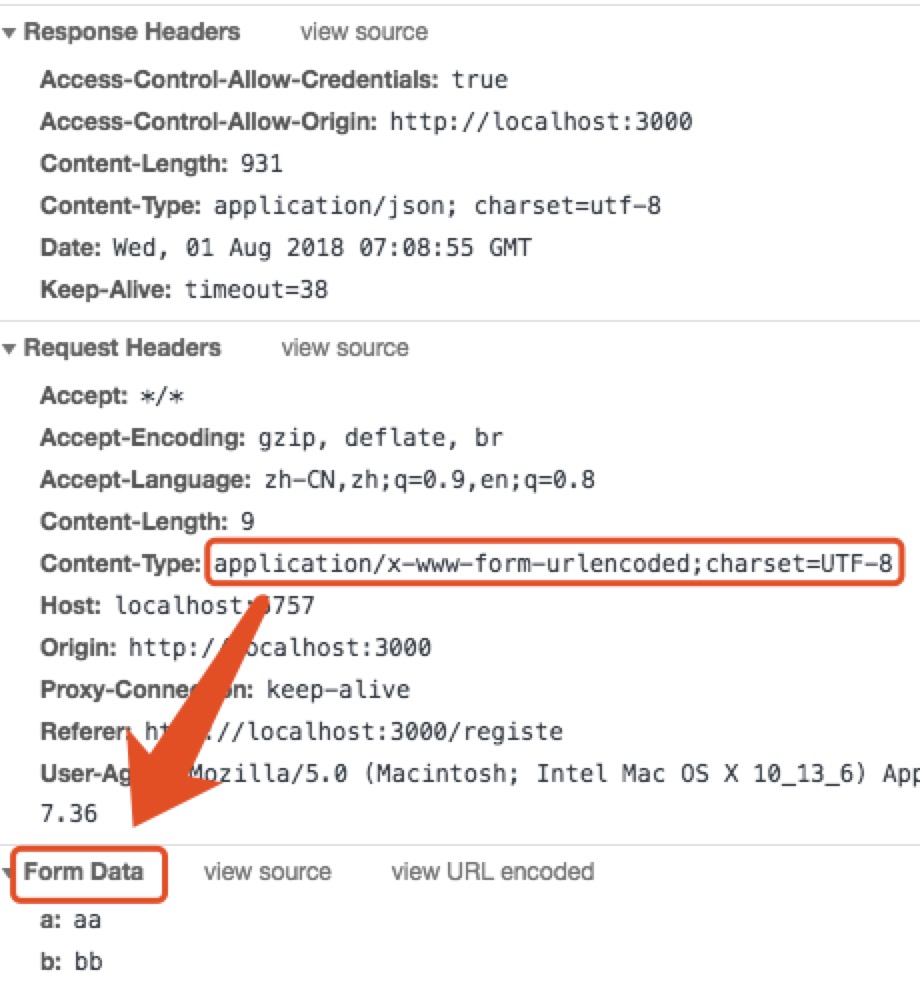
服务端解析:

场景2urlencoded方式、多维数据。【不可行】
客户端请求:
1 | fetch('http://localhost:5757/register1',{ |
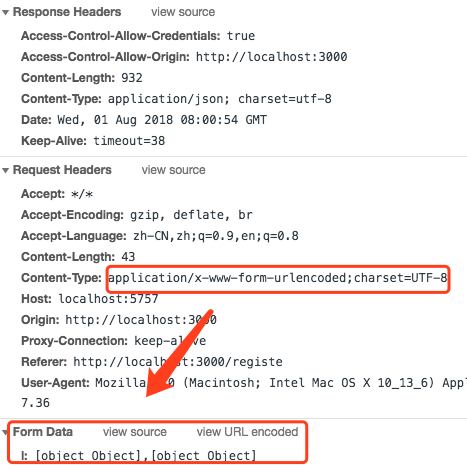
服务端解析:

场景3multipart/form-data方式,一维数据上送,本质也是数据流的传输,以键值对解析。【推荐】
客户端请求:1
2
3<input type="file" name='file'/>
<input type="file" name='file2'/>
<input type="text" name='text'/>
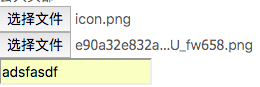
1
2
3
4
5
6
7
8
9
10
11
12
13
14
15let files = new FormData();
files.append('file',document.getElementsByName('file')[0].files[0]);
files.append('file2',document.getElementsByName('file2')[0].files[0]);
files.append('text',document.getElementsByName('text')[0].value);
fetch('http://localhost:5757/register1',{
method : 'post',
body : files
}).then((res)=>{
return res.json();
}).then((data)=>{
console.log(data)
}).catch((err)=>{
message.error(err)
})
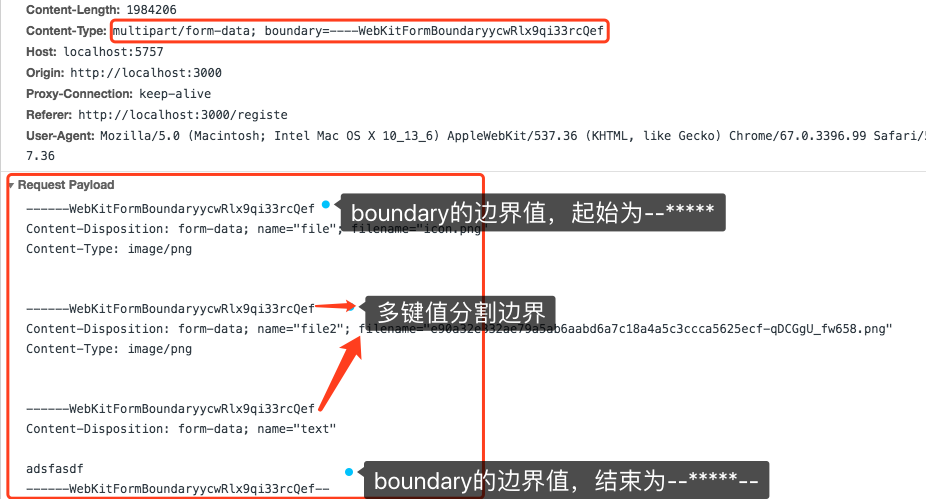
1
2
3
4
5
6
7
8
9
10//响应实体处理
const body = require('koa-body');
app.use(body({
multipart : true, //支持multipart-formdate表单数据解析
formidable : {
uploadDir : path.join(__dirname,'./public/imgs'), //指定上传后的目录
keepExtensions : true,//保留原来的文件后缀
maxFieldsSize : 2 * 1024 * 1024
}
}));
服务端解析:1
2
3
4
5
6
7
8
9
10
11
12
13
14
15
16
17
18
19
20
21
22
23
24
25
26
27
28
29
30
31
32
33
34
35
36
37
38
39
40
41
42
43
44
45
46
47
48
49
50
51
52
53
54
55
56
57
58
59res files====> { file:
File {
domain: null,
_events: {},
_eventsCount: 0,
_maxListeners: undefined,
size: 1284749,
path: '/Users/zhangjun/workspace/test_website/public/imgs/upload_8b07b9ab83bb834e8548c2f890768909.png',
name: 'icon.png',
type: 'image/png',
hash: null,
lastModifiedDate: 2018-08-01T09:31:34.139Z,
_writeStream:
WriteStream {
_writableState: [Object],
writable: false,
domain: null,
_events: {},
_eventsCount: 0,
_maxListeners: undefined,
path: '/Users/zhangjun/workspace/test_website/public/imgs/upload_8b07b9ab83bb834e8548c2f890768909.png',
fd: null,
flags: 'w',
mode: 438,
start: undefined,
autoClose: true,
pos: undefined,
bytesWritten: 1284749,
closed: true } },
file2:
File {
domain: null,
_events: {},
_eventsCount: 0,
_maxListeners: undefined,
size: 698984,
path: '/Users/zhangjun/workspace/test_website/public/imgs/upload_8d96d91e701b17ed10a725851f926d21.png',
name: 'e90a32e832ae79a5ab6aabd6a7c18a4a5c3ccca5625ecf-qDCGgU_fw658.png',
type: 'image/png',
hash: null,
lastModifiedDate: 2018-08-01T09:31:34.161Z,
_writeStream:
WriteStream {
_writableState: [Object],
writable: false,
domain: null,
_events: {},
_eventsCount: 0,
_maxListeners: undefined,
path: '/Users/zhangjun/workspace/test_website/public/imgs/upload_8d96d91e701b17ed10a725851f926d21.png',
fd: null,
flags: 'w',
mode: 438,
start: undefined,
autoClose: true,
pos: undefined,
bytesWritten: 698984,
closed: true } } }
res body=====> { text: 'adsfasdf' }
可以看出文件会被
koa-body注入到ctx.request.files中,其他form数据被koa-body注入到ctx.request.body中。
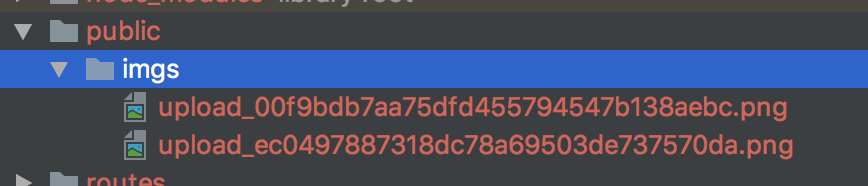
可以看出文件已经被上传到指定目录下。
场景4multipart/form-data方式,多维数据。【不可行】
因为此方式只适用于表单媒体数据的键值关系,所以不能表达多维数据。
场景5text/plain;charset=UTF-8方式,纯文本方式。【可行】
客户端请求:1
2
3
4
5
6
7
8
9
10
11
12
13
14fetch('http://localhost:5757/register1',{
method : 'post',
body : `
<h3>静夜思</h3>
<p>床前明月光,疑是地上霜。</p>
<p>举头望明月,低头思故乡。</p>
`
}).then((res)=>{
return res.json();
}).then((data)=>{
console.log(data)
}).catch((err)=>{
message.error(err)
})
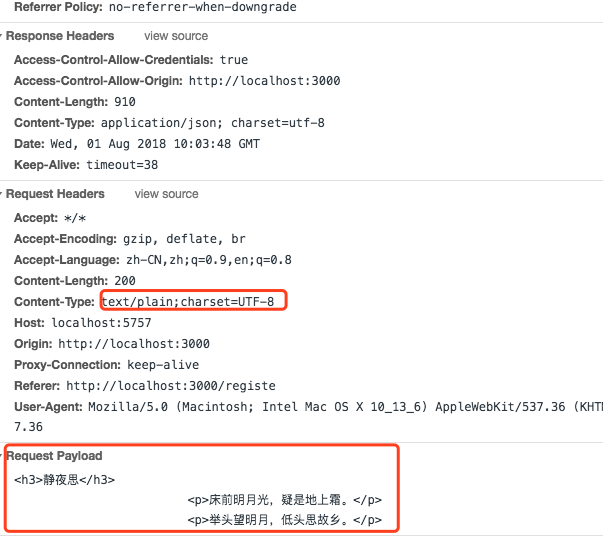
服务端解析: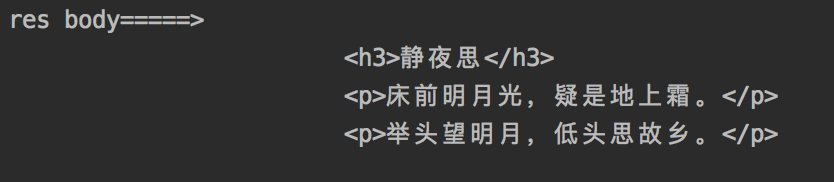
场景6text/plain;charset=UTF-8方式,json字符串方式(包括多维数据)。【可行】
客户端请求:
1 | fetch('http://localhost:5757/register1',{ |
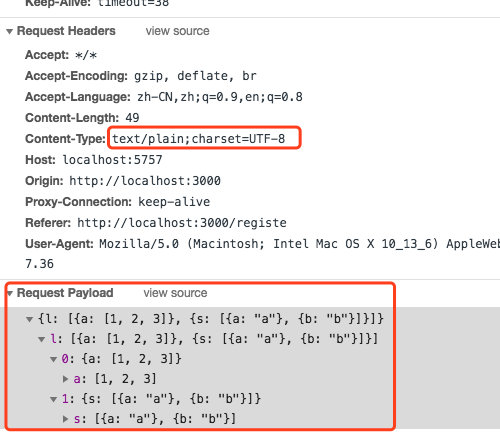
服务端解析:

选什么?
1、通常站点内不会采用
query string的方式前后端交互,除非一些特殊情况,如果是那样,只需要在特定的Controler中支持就行。2、【推荐】选用
Request Payload方式进行前后端数据交互,需要上传文件时可以选用multipart/form-data方式.3、上传文件也可以通过json字符串携带文件的base64值的方式,这样就可以实现json单一格式的交互方式,只不过
koa-body没有针对json中base64的读写操作,需要服务端自己开发读写逻辑。
结论
针对于现有选型,定位为:
json字符串做基本数据交互格式;
multipart/form-data做文件上传交互方式;服务端从rtx.request.body / rtx.request.files中获取这些数据。
原文=> http://blog.thephenix.com/2018/07/31/FSR-httpdata/ 【请尊重版权】